MESSAGE TYPE E in EWM RF - Dynpro knowledge that we may slowly lose
After around 5 years of quite frankly mostly dodging it, I recently had the pleasure of actively working with EWM RF again.
If you don't know anything about Radio Frequency Framework (RF) in EWM, then the quickest summary would be:
A technology that connects handheld devices, scanners, and vehicle-mounted terminals directly to the warehouse management system in real-time. It enables warehouse personnel to perform tasks like picking, packing, and inventory, improving efficiency and accuracy.
It's quite market-y but gets the point across. It combines extended customization options with the ABAP stack's Dynpro technology, allowing for different personalization profiles as well as switching Dynpros "dynamically" based on the device type. This creates great flexibility with arguably an old and, at times, "limited" technology stack.
Back to the point. I got back into RF development quite quickly, looked around in the customizing and changed a few things. Aside from a few minor hiccups everything went smoothly. Then I tested the implementation and found a very odd and (to me) frustrating user experience.
Analysis
The following image shows the Dynpro screens involved (color coded) as well as some hints to their usages within the RF.
Have a look. I'll tell you what happens and what is expected right after.
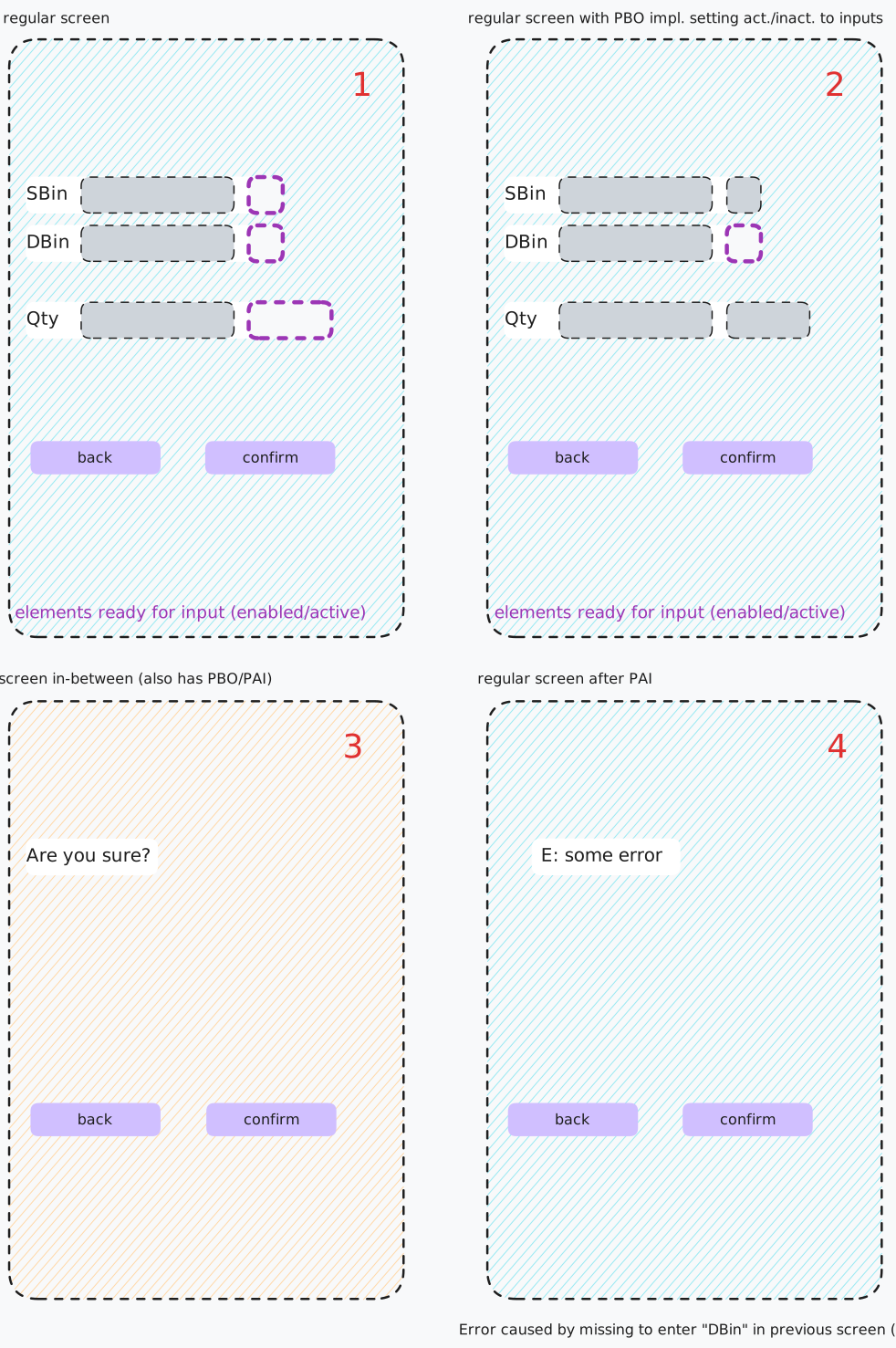
The erroneous screen flow:
- 2 → 3 → 4 → 1
The screen flow we want:
- 2 → 3 → 4 → 2
This led me to do some digging. I found out that this implementation has always been like that and I was simply the first to notice so I couldn't help but try to fix it.
The Fix
The fix, in retrospect, is really simple. But at the time I was a bit confused as to why it happens in the first place. The PBO1 and PAI1 implementations all seemed correct to me so ... what was I missing?
Here is what was used to create the error message in Screen 4. An ... error message! Straightforward, right?
MESSAGE e187(ZSOME_MSG_CLASS).
The catch: a MESSAGE TYPE 'E' in PAI skips PBO entirely and just re-displays the current screen. That means Screen 4 reappears without PBO re-evaluating which screen to navigate to next.
And here is the fix. It was something that I thought might work, not yet having checked the documentation, which I did afterwards.
The set_screlm_input_off method disables input for a given screen element. Essentially mimicking what PBO would normally do when preparing the screen for re-display.
" When MESSAGE of TYPE 'E' (w/o INTO) is used, RF does not execute the PBO again (any Dynpro behaves like that for MSG TYPE 'E')
" Instead the current screen is simply re-entered (= reloading, or step & function code [fcode] are set again)
" thus setting the screen inputs here again (like in PBO) and letting the PAI, in this case, act as PBO does the trick.
/scwm/cl_rf_bll_srvc=>set_screlm_input_off( '/SCWM/S_RF_ORDIM_CONFIRM-VLPLA_VERIF' ).
/scwm/cl_rf_bll_srvc=>set_screlm_input_off( '/SCWM/S_RF_ORDIM_CONFIRM-NISTA_VERIF' ).
There are some other possible fixes like using a different way to display error messages i.e. the /scwm/cl_rf_bll_srvc service class itself. But I'm not here to refactor the screens or behavior, I simply wanted the current state to work properly without changing things that I wasn't even supposed to touch in the first place.
Closing Thoughts
On this particular day, I did not want to spend my evening debugging the RF framework or, in this case, scour through the F1 help for Dynpros. So I did what I do too rarely and asked my colleagues for help. To my surprise, even the most RF-knowledgeable one could not explain the behavior.
So in the end, after finding the fix, I checked the F1 help regardless, just so I can find the explanation I was looking for and confirm what I suspected.
Here it is:
"PAI processing is interrupted and the screen is displayed again without raising the event PBO and without a field on the screen being ready for input." -Messages in PAI Events
This entire odyssey left me asking: are we slowly losing our knack for Dynpros?
References/Links
- ABAP Docs: Handling of Messages from the PAI Event
- ABAP Docs: Messages in Dialog Processing
- SAP Community Question
Footnotes
Process Before Output, Process After Input↩